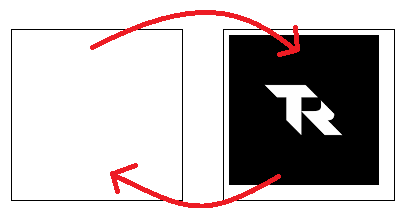
How to drag and drop an object from one Div to another div using pure JavaScript?
Yes. We can use HTML5’s power to drag and drop any object from one div to another using only JavaScript no other library like jQuery so that our webpage will get too heavy.
What you need?
- 1 HTML page
- 1 image
so lets start with basic.
first of all create html page and write following code into that page:
<html>
<head>
<title>Tj’s Solution for drag and drop</title>
</head>
<body>
<div id="drop_container" ondrop="drop(event)" ondragover="DopHere(event)"></div>
<img id="image_drag" src="https://www.tejasrana.com/wp-content/uploads/2015/06/TR.png" draggable="true" ondragstart="image_drags(event)">
</body>
</html>
write this script to drag and drop
<script>
function DopHere(ev) {
    ev.preventDefault();
}
function image_drags(ev) {
    ev.dataTransfer.setData("text", ev.target.id);
}
function drop(ev) {
    ev.preventDefault();
    var data = ev.dataTransfer.getData("text");
    ev.target.appendChild(document.getElementById(data));
}
</script>
Now we have one simple problem is that if that div have already one image and also its capacity to store one image then we have to set a validation. for that validation:
<script>
function hasImage(id) {
       var arrival_div=document.getElementById(id);
       var childElements = document.getElementById(id).childNodes;
       for (var i = 0; i < childElements.length; i++) {
         if (childElements[i].localName != null && childElements[i].localName.toLowerCase() == "img") {
           return true;
         }
       }
       return false;
     }
</script>
This function will check that the target div have img tag or not. now we set condition before dropping.
So our drop function will look like this:
<script>
function drop(ev,div_id) {
       ev.preventDefault();

       var hasImages =hasImage(div_id);
       var data = ev.dataTransfer.getData("text");
       if(hasImages==false){
         var data = ev.dataTransfer.getData("text");
         ev.target.appendChild(document.getElementById(data));
       }else{
alert(‘div already have an image.’);
}
     }
</script>
So the complete output look like this with more improved:
<html>
<head>
<title>drag and drop - From Tejas Rana (TejasRana.com)</title>
<style>
#drop_container{border:1px solid #000; width:160px; height:160px; padding:5px; float:left; margin:20px;}
#dropback_container{border:1px solid #000; width:160px; height:160px; padding:5px;float:left; margin:20px;}
</style>
</head>
<body>
<iframe src="https://www.tejasrana.com/header-only/" frameborder="0" scrolling="no" style="border:0px; width:100%;"></iframe>
<div id="drop_container" ondrop="drop(event,'drop_container')" ondragover="DopHere(event)"></div>
<div id="dropback_container" ondrop="drop(event,'dropback_container')" ondragover="DopHere(event)"><img id="image_drag" src="https://www.tejasrana.com/wp-content/uploads/2015/06/TR.png" draggable="true"
ondragstart="image_drags(event)"></div>
<script>
function DopHere(ev) {
    ev.preventDefault();
}
function image_drags(ev) {
    ev.dataTransfer.setData("text", ev.target.id);
}
function drop(ev,div_id) {
       ev.preventDefault();

       var hasImages =hasImage(div_id);
       var data = ev.dataTransfer.getData("text");
       if(hasImages==false){
         var data = ev.dataTransfer.getData("text");
         ev.target.appendChild(document.getElementById(data));
       }else{
alert('div already have an image.');
}
   }
function hasImage(id) {
       var arrival_div=document.getElementById(id);
       var childElements = document.getElementById(id).childNodes;
       for (var i = 0; i < childElements.length; i++) {
         if (childElements[i].localName != null && childElements[i].localName.toLowerCase() == "img") {
           return true;
         }
       }
       return false;
     }

</script>
<iframe src="https://www.tejasrana.com/footer-only/" frameborder="0" scrolling="no"  style="border:0px; width:100%;"></iframe>
</body>
</html>
[wpdm_package id=’2298′]